SparrowXL EIA Data Edition
SparrowXL is not affiliated with or endorsed by the
U.S. Energy Information Administration. EIA data is public domain;
“EIA” identifies the data source.
130,391 petroleum series. One import. Every EIA bulk dataset.
Live formulas in your workbook. Analytics that run offline.
An add-in that watches EIA for you. Free.
Petroleum is the first click — the US data the whole market
trades on — and the same import reaches every dataset in EIA's bulk manifest.
Download — free, 40.9 MB
The five-minute trial
Five minutes to a live petroleum dashboard
Three steps, then one click that keeps it current.
No Python, no API key, no account, no server.
1 — Download, then unblock the zip before extracting
Download
the zip (40.9 MB). Windows marks internet downloads, and Excel refuses
add-ins that carry the mark — a notification bar with no enable button.
Right-click the downloaded zip → Properties →
tick “Unblock” → OK. Then extract.
This is the step people skip, and the number-one reason the add-in
“doesn't work”. Unblocking the zip first clears the mark on everything
inside; extracting first means unblocking files one by one.
On some company-managed machines the Unblock checkbox is
absent — policy blocks internet add-ins outright. That is an IT conversation, not
a setting; the LICENSE and third-party notices in the zip are written to make it
an easy one.
2 — Add the add-in to Excel
Extract somewhere the folder can live (e.g. C:\SparrowXL\) — not
Downloads, not a temp folder; Excel remembers the path. Then:
First, check your Excel's bitness — File → Account → About
Excel, the top line ends “64-bit” or “32-bit”.
The zip ships an add-in file for each:
| Your Excel | Pick this file |
|---|
| 64-bit (most machines) | EnergyScope-AddIn64-packed.xll |
| 32-bit | EnergyScope-AddIn-packed.xll — the one without “64” |
Then: Excel → File → Options → Add-ins → at the bottom,
Manage: Excel Add-ins → Go… → Browse… → pick your file → OK.
On first load Excel shows a security notice naming the publisher —
David Linton — with an option to trust it permanently.
The EnergyScope ribbon tab appears, and comes back on every
Excel start. Don't double-click the XLL in Explorer — that opens it as a
document and Excel complains about the file format; the Add-ins dialog is
the way in.
3 — Point at the bundled data, build a sheet
Ribbon → Dataset Folder → pick the extracted
eia-data folder. That is 130,391 petroleum series, ten years of
history, local and offline — the bundle's vintage is stamped in
eia-data\VINTAGE.txt.
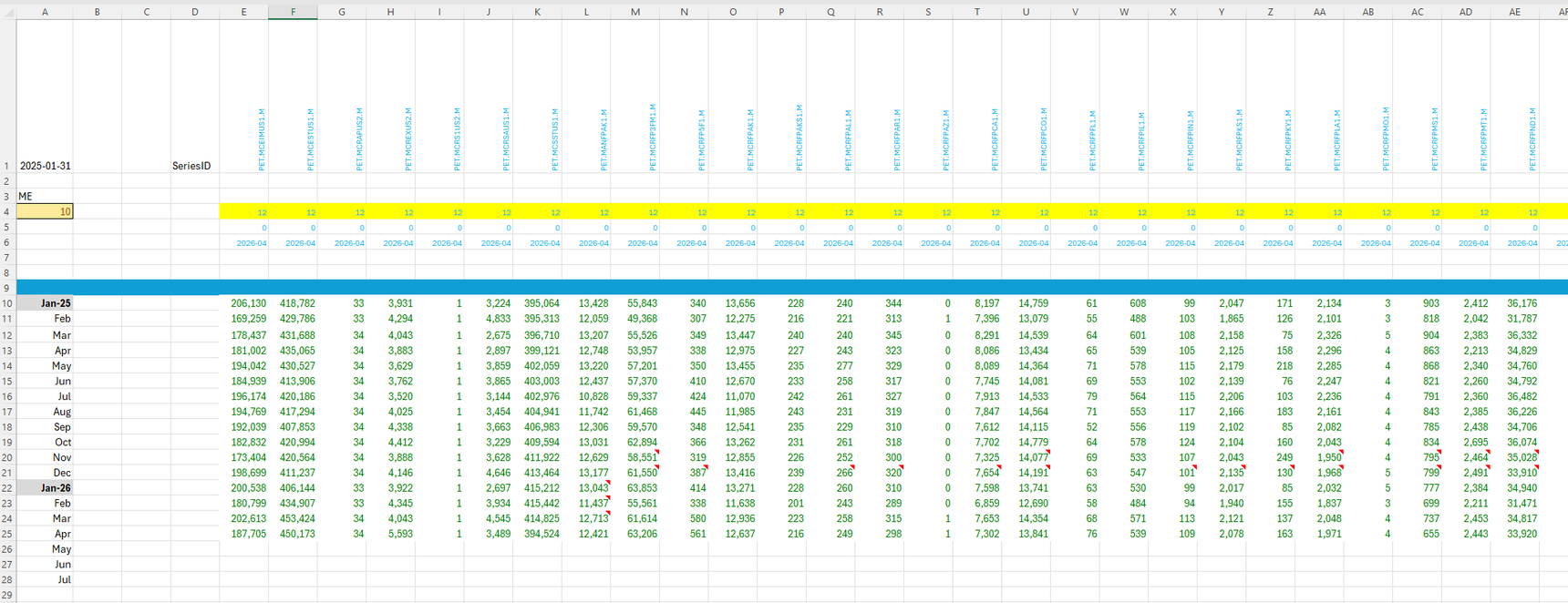
Then New Sheet → WPSR Day. The sheet builds and fills
itself. Everything is a formula — click any cell to see how it's made.
4 — Update EIA: one click, no Python
Ribbon → Update EIA. The add-in downloads
EIA's official bulk file — from eia.gov directly, no middleman — and rebuilds
the dataset in place. Run it again and it says “already up to date”: it
checks EIA's own change signals instead of re-downloading.
From then on it watches for you: when EIA publishes, the ribbon shows
NEW DATA, the sheet's labels light up, and your workbook tells
you it is behind before you ask. The bundled copy will be behind EIA within days
of its cut — so your first refresh is the freshness ladder demonstrating itself.
The honest comparison
EIA publishes its own Excel
add-in (v4.1). If it does what you need, use it. Here is where the two
differ, row by verifiable row.
| EIA Add-In (v4.1) | SparrowXL — EIA Data Edition |
|---|
| Retrieval | one series per Get Data click | whole bulk dataset in one import, then live formulas |
| Offline | internet required | full analytics against your local folder |
| Freshness | re-fetch on click; nothing tells you new data exists | watches EIA → folder → workbook; announces on open |
| Analytics | quick graphing | 77 functions: forecasts, spreads, seasonality, signals |
| Standing reports | — | the WPSR-day ritual sheet in the bundle; the full weekly tables EIA retired (TWIP-style, gas weekly, CoT, rigs) with a connected EnergyScope source |
| Data | free, EIA API | free — same EIA source data, EIA's own bulk files (EIA refreshes them twice daily, 5am/3pm ET) |
| Docs era | written for Excel 2010/2013 | current |
What we'd concede
EIA's add-in has a FRED integration that reaches all of FRED; this edition's
bundle is EIA petroleum only. And the .gov trust halo is real — an official
add-in from the agency itself is an easy install to justify. If those matter
more to you than the rows above, their add-in is the right choice —
compare for yourself.
What's inside
77 analytics functions
Forecasts, spreads, seasonality, signals — computed inside the add-in,
straight from your files. Turn the Wi-Fi off; your analysis keeps working.
No SQL anywhere, ever: a series ID in a formula, data in the sheet.
This Week in Petroleum, rebuilt as standing sheets
EIA retired the This Week in Petroleum data tables and the
gas weekly. The bundle ships the WPSR Day ritual sheet —
headline table, ranked movers, five-year seasonal context, live NEW DATA
labels — against the local petroleum data, offline. The full standing weekly
rebuilds (the TWIP-style tables with their written brief, the gas weekly, CoT
positioning, rig counts) are part of the wider platform and light up with a
connected EnergyScope source.
Sheets that build themselves
The New Sheet menu builds complete analyst pages in one click — WPSR Day
among them: parameter cells with dropdowns, change tracking, labelled series.
Each page design is a plain JSON recipe that ships beside the add-in; a new
page design is a file, not a release.
The freshness ladder
Freshness is a chain, and every link reports honestly:
Publisher EIA posts new bulk data
Folder one click rebuilds your dataset
Workbook ribbon: NEW DATA
Analyst exactly the changed cells, marked
It announces on workbook open, and it works unattended — your workbook
tells you it is behind before you ask.
Download
SparrowXL — EIA Data Edition
Free
- The add-in, plus a bundled local dataset: 130,391 petroleum series
- Sheet recipes, WPSR Day among them
- One-click Update EIA — no Python
Download the zip (40.9 MB)
Signed: David Linton (Certum). Then step 1 above:
unblock before extracting.
Requirements
- Excel for Microsoft 365 or Excel 2021+ — the formulas spill; older Excel shows single cells
- Windows desktop, 64-bit or 32-bit Excel — the zip ships an add-in file for each. Not Mac, not Excel on the web
- .NET 8 Desktop Runtime matching your Excel's bitness (x64 or x86) — free, 2-minute install (“Run desktop apps”); no admin rights needed for the user installer
- ~300 MB free disk if you refresh the full dataset from EIA
Power users: the optional
refresh
kit (36.9 MB) — Vortex converter + Python importer.
WPSR-day sheet updates
Get WPSR-day sheet updates and new-release notices. Optional — the
download above is not gated.
Privacy
The add-in checks EIA's public manifest directly — eia.gov, nothing in
between — and only on a toggle. Feedback is opt-in, per message, when you type
=ES.Feedback(). Nothing else leaves your machine: no account, and
your data stays in your folder.
Something broke?
“Microsoft has blocked this file” — step 1 was
skipped. Delete the extracted folder, unblock the zip, extract again.
Listed as Active, publisher shown, but no EnergyScope tab — and
formulas return #NAME? — Excel accepted the add-in file for the
other bitness and it fails silently. Check File → Account → About
Excel, untick the wrong file (File → Options → Add-ins), and browse
to the matching one: 64-bit Excel takes
EnergyScope-AddIn64-packed.xll, 32-bit takes
EnergyScope-AddIn-packed.xll. If the bitness already matches,
the same symptom means the block mark (step 1) or the missing
.NET 8
Desktop Runtime — in that order.
“The file format and extension … don't match” /
“could be corrupted or unsafe” — nothing is corrupted.
Excel says this when an add-in file is opened as a document (double-clicked)
or when the wrong-bitness file is re-attempted at startup. Load the matching
file through File → Options → Add-ins instead.
Formulas show one value instead of a table — your Excel
predates dynamic arrays; it needs Microsoft 365 or 2021+.
Anything else: type =ES.Version() in a cell and send what you
see with =ES.Feedback("what happened") — or email
[email protected].